Can ChatGPT read your site? How to check AI crawler access
Before ChatGPT, Claude or Perplexity can cite a page, a crawler has to fetch it. Which AI crawlers matter, the three ways business sites block them by accident, and what we'd put in robots.txt.
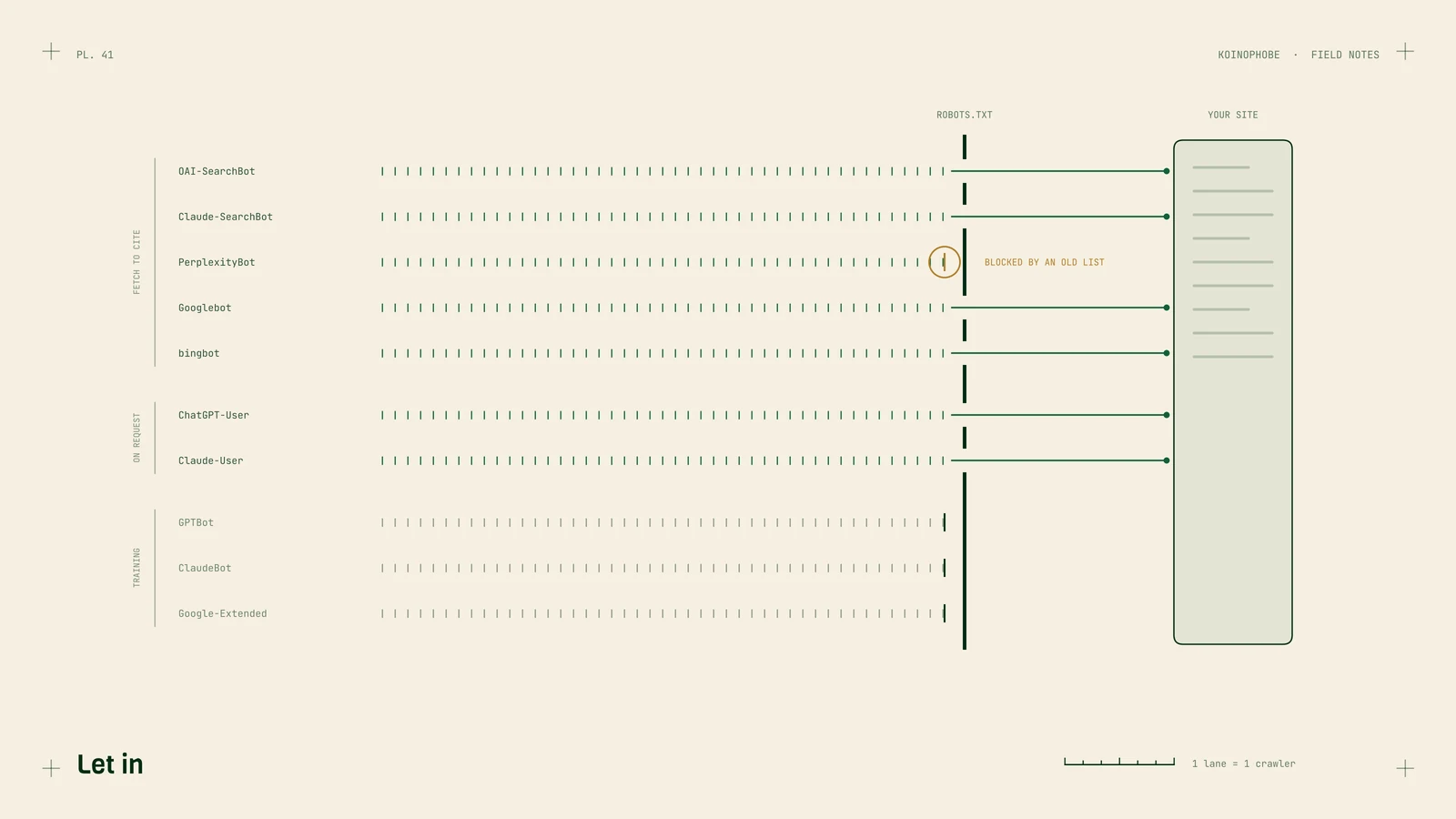
Before an assistant can cite a page, something has to fetch it. On most business sites we check, nobody has decided which AI crawlers get in. A template, a plugin or a CDN default decided for them.
This note covers which crawlers matter, the three ways sites block them without meaning to, and what we'd put in robots.txt. If you want the answer for your own site first, the free crawler check reads your robots.txt for all of them and looks at your homepage the way a crawler that doesn't run JavaScript would.
Two kinds of AI crawler
When we set up our citation study, our first version counted every AI bot as one group. That made a site that blocks training scrapers and welcomes the crawlers that fetch pages for answers look closed to AI, which is backwards. That setup is a deliberate, sensible choice. So we split them, and the split is the first thing to understand about your own robots.txt.
The companies run separate crawlers for separate jobs, and they document them:
| Company | Fetches pages to cite them | Collects training data | Opens a page when someone asks |
|---|---|---|---|
| OpenAI | OAI-SearchBot | GPTBot | ChatGPT-User |
| Anthropic | Claude-SearchBot | ClaudeBot | Claude-User |
| Perplexity | PerplexityBot | none, per its docs | Perplexity-User |
| Googlebot (Search and AI Overviews) | Google-Extended (a robots.txt token for Gemini and Vertex AI) | none |
Three details change what you should do:
The settings are independent. OpenAI says so in its crawler docs: you can allow OAI-SearchBot for ChatGPT search and disallow GPTBot to opt out of training. Blocking GPTBot does not take you out of ChatGPT search.
Google-Extended is not an AI Overviews switch. Google added a line to its documentation saying Google-Extended does not affect inclusion or ranking in Google Search. AI Overviews live inside Search. Blocking Googlebot to stay out of them would take you out of Search with them.
The user-triggered fetchers play by different rules. OpenAI says robots.txt rules may not apply to ChatGPT-User, because a person asked for the page. Perplexity says Perplexity-User generally ignores robots.txt for the same reason. Anthropic says blocking Claude-User stops Claude retrieving your pages when someone asks.
Copilot answers from Bing, so Bingbot belongs on the list too, even though it isn't an "AI crawler" by name.
Three ways sites block them by accident
1. A robots.txt nobody has read since launch
The common ones we see:
User-agent: *withDisallow: /, left over from a staging site that became production.- A block list pasted from a 2023 thread, when blocking GPTBot was news. Some of those lists also name OAI-SearchBot, PerplexityBot or anthropic-ai and ClaudeBot together, which takes out search along with training.
- Rules for
/that were meant for/app/. A missing path segment blocks the marketing site with the dashboard.
Open yourdomain.com/robots.txt and read it. If a group names one of the crawlers above, that group applies to it and the * group doesn't. If nothing names it, the * group decides.
2. A firewall setting that never shows up in robots.txt
On July 1, 2025, Cloudflare changed its default to block AI crawlers from the sites it protects, with owners choosing which ones to let back in. That decision lives in the dashboard. Your robots.txt can say Allow: / to everyone while the firewall answers OAI-SearchBot with a challenge page.
Other CDNs and WAFs have bot rules too. If you're behind one, check its bot settings as well as robots.txt. Our checker can't see these rules from outside; it can only tell you when your homepage refused it, which is a hint that it may refuse other automated visitors.
3. A page that's empty until JavaScript runs
Google renders JavaScript. Many AI crawlers fetch the raw HTML and stop there. If your marketing site is a client-rendered app, the raw HTML is a <div id="root"> and a script tag.
In our study, 94.9% of the pages assistants cited had their body text in the raw HTML. That measure didn't separate cited pages from the pages that ranked, because nearly everything in both groups was server-rendered. Read the other way round, only about 1 in 20 cited pages needed JavaScript to show its text.
To check: open your homepage, view source (Ctrl+U), and search for a sentence you can see on the page. If it isn't in the source, a crawler that doesn't run JavaScript can't see it either.
What we'd put in robots.txt
For most home service businesses we'd let in everything that fetches pages for answers, then decide training on its own merits. Something like this:
# Fetch pages for answers and search results
User-agent: OAI-SearchBot
Allow: /

User-agent: Claude-SearchBot
Allow: /

User-agent: PerplexityBot
Allow: /

# Training: your call. These lines opt out.
User-agent: GPTBot
Disallow: /

User-agent: ClaudeBot
Disallow: /

User-agent: Google-Extended
Disallow: /

# Everyone else, Googlebot and Bingbot included
User-agent: *
Disallow: /app/
Disallow: /api/
Whether to block training is a business call. Opting out keeps your content out of future training sets, and none of the three companies documents any effect on search visibility from doing it. What we wouldn't do is block the citation crawlers to make a point about training, because those are the ones that put a link to you in an answer.
Two things to remember after you edit it. Rules apply per host, so docs.yourapp.com needs its own robots.txt. And robots.txt only matters if the request gets past your firewall in the first place.
Next steps
Run the crawler check on your main domain and your docs subdomain. If everything that fetches pages for answers is allowed and your pages have text before JavaScript runs, the next question is whether you have pages worth citing. We wrote up how we build comparison pages that assistants cite, and how to track AI search visibility without being fooled by one screenshot.
This is also the first week of our AI search optimization service: crawler access and rendering get fixed before any writing starts, because nothing else works until they do.
Frequently asked questions
Does blocking GPTBot keep my site out of ChatGPT search?
No. OpenAI runs separate crawlers and says each setting is independent. GPTBot collects training data; OAI-SearchBot is the one ChatGPT search uses. You can block one and allow the other.
Does Google-Extended control AI Overviews?
No. Google says Google-Extended does not affect a site's inclusion or ranking in Google Search. AI Overviews are part of Search and draw on what Googlebot crawls, so the only robots.txt way out of them is out of Search too.
Can a site block AI crawlers without touching robots.txt?
Yes. A firewall or CDN rule can refuse the request before robots.txt matters. Cloudflare switched to blocking AI crawlers by default on July 1, 2025, so a clean robots.txt is no proof that they get in.