AI Overviews and your traffic drop: how to tell, and what to do
Impressions up, clicks down, rankings fine? That's often an AI Overview answering the question on the results page. How to confirm it in Search Console, which pages are exposed, and how to shift effort to searches that still send customers.
A business owner sends us a Search Console screenshot: impressions up 40%, clicks down 20%, average position barely moved. "Did we get penalized?"
Usually not. More often, Google started answering some of their searches on the results page, with an AI Overview, a featured snippet, or both, and fewer people need to click. Here's how to tell, and what to do.
The pattern to look for
In Search Console's Performance report, compare the last three months with the same three months a year earlier, or the period before. You're looking for queries or pages where:
- Impressions held or rose,
- Clicks and CTR fell,
- Average position stayed about the same.
That combination means you're still being shown, just clicked less. A ranking drop looks different: impressions and position fall together.
Google counts AI Overview and AI Mode traffic inside the normal Web search type, so there's no filter for it. You infer it from the pattern and confirm by hand.
What it looked like on a site we work on
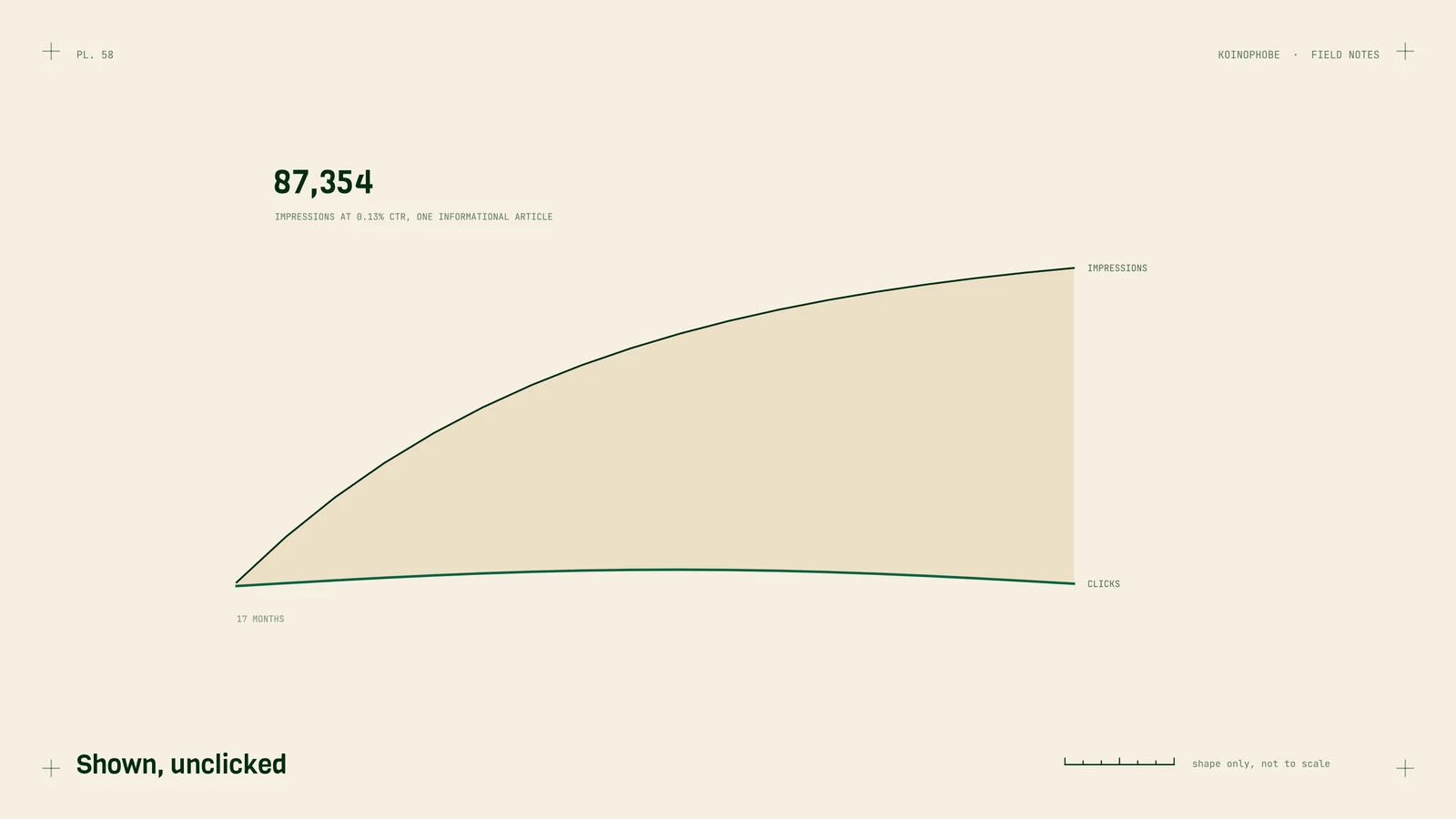
One agency site we work on has an informational article about how far the town is from Orlando. Over 17 months it collected 87,354 impressions at a 0.13% click-through rate. People get the answer on the results page and move on. That's zero-click search, and it was happening before AI Overviews made it more common. We wrote about it in zero-click rankings.
On sites like this, the exposure is concentrated in informational questions with short answers.
Which pages are exposed
Most exposed:
- Short factual answers: definitions, distances, conversions, "how long does X take."
- General how-to questions a summary can cover in a paragraph.
- Lists of tips that every site repeats.
Least exposed:
- Searches with buying intent: "emergency plumber near me," "book a dentist Saturday," "buy," "pricing," "quote."
- Local map-pack searches, where people tap to call or get directions.
- Questions that need judgment, numbers or your experience: costs in your area, comparisons, "is it worth it for my situation."
What to do about it
Confirm by hand. Take the 20 queries with the biggest click drops, search them in an incognito window, and note whether an AI Overview appears and who it cites. Repeat next month; Overviews appear and disappear.
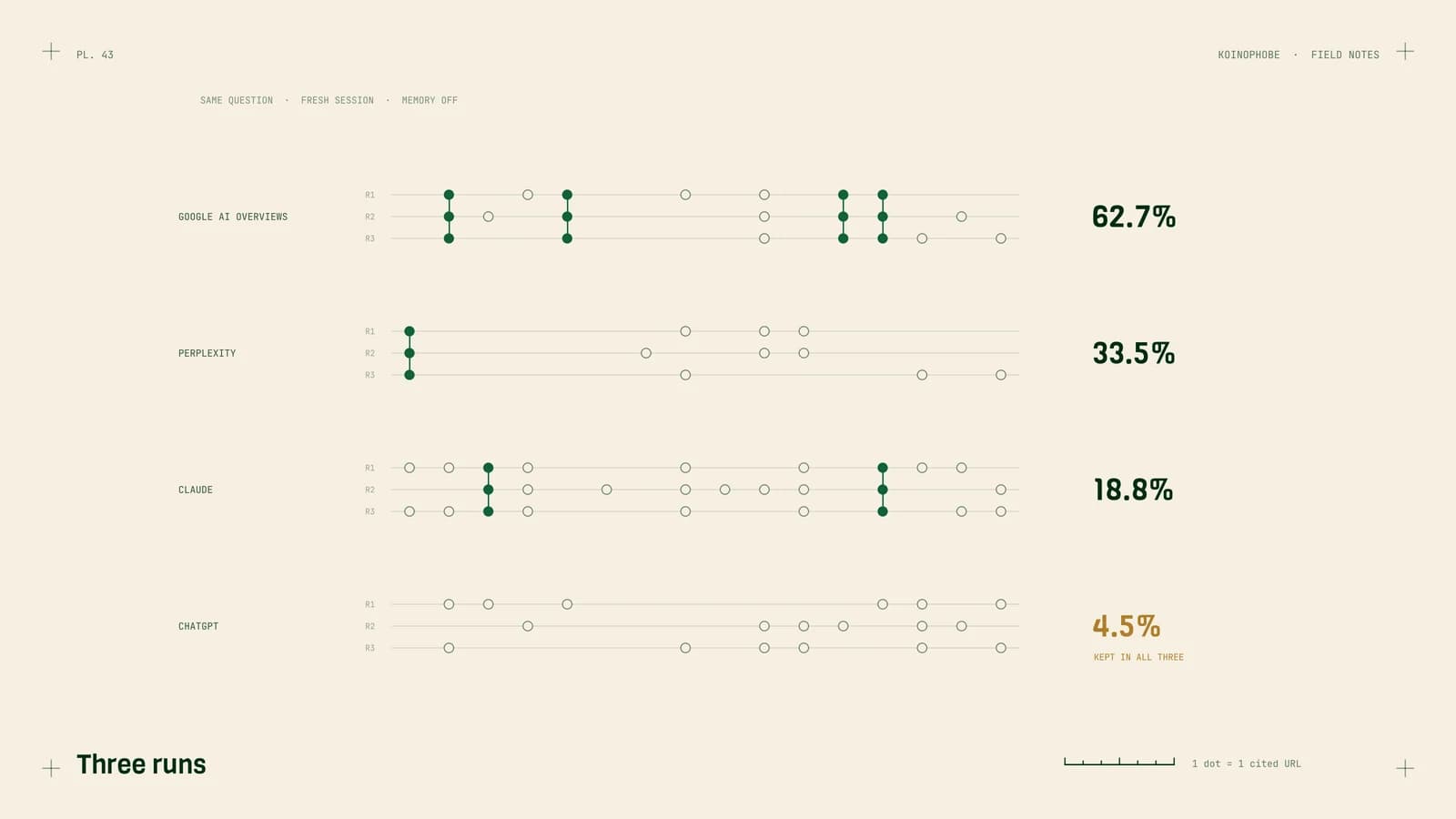
Try to be the cited source. If an Overview answers the question anyway, you want to be one of its links. Google says pages need to be indexed and snippet-eligible, with no special requirements. In our own study, Google's Overviews cited pages that weren't in the top ten 97.8% of the time, so a well-structured page answering the exact sub-question can win a citation without ranking first. How to appear in AI Overviews.
Give the click a reason. Rewrite titles and descriptions to promise what the summary can't: local prices, a calculator, photos of real jobs, a checklist to download. "How long does a roof replacement take? Our schedule from real Tampa jobs" offers something a summary can't.
Shift effort toward buying searches. Service pages, town pages, comparison and pricing pages, and your Google Business Profile. Those still send customers. For most local and service businesses, that's where the money was anyway.
Measure customers as well as clicks. If calls and bookings hold while clicks fall, you lost readers and kept the customers. Make sure you're tracking calls and forms so you can tell the difference.
What not to do
- Block Google's AI features to protect clicks. The only controls are snippet controls and noindex, which also hide you from regular results. For most businesses that costs more than it saves.
- Delete informational pages. They often support your commercial pages through internal links and help you get mentioned in answers. Improve them; don't remove them.
- Assume it's a penalty and start changing everything. Check the pattern first.
Next steps
Open Search Console, compare the last three months with the previous period, and sort pages by click change. If the top losers are informational and their positions held, you're looking at answers on the results page, not a penalty. Then pick the five buying-intent pages that matter most and improve them first.
Our AI search optimization service runs this diagnosis, tracks AI Overviews alongside ChatGPT, Claude and Perplexity monthly, and builds the pages that get cited. $1,000 a month, no contract.
Frequently asked questions
Are AI Overviews reducing my website traffic?
They can, mostly on informational searches where the summary answers the question. The sign in Search Console is impressions holding or rising while clicks and click-through rate fall, with average position unchanged. Google counts AI Overview traffic inside normal Web search results, so you have to infer it.
How do I know if a query shows an AI Overview?
Search Console doesn't flag it. Check your most important queries by hand in an incognito window, note whether an AI Overview appears and who it cites, and repeat monthly. Overviews come and go, so one check isn't enough.
What should I do if AI Overviews take my clicks?
Shift effort toward searches with buying intent, where people still click to call, book or buy. Make your informational pages the ones the Overview cites, so you at least earn the mention, and update titles so the click offers something the summary can't.