Contact form not working? An email setting and a speed plugin broke two client forms
Contact form not working on your WordPress site? Two causes we found on client sites, how each was fixed, and the monthly test that catches the next one.

A contact form can stop working without any error on the page. The form loads, the button looks fine, and the leads quietly stop reaching anyone. Most people find out weeks later, if they find out at all.
It has happened on two sites we work on, for two different reasons. Here is what broke each time, how it was fixed, and the test we run now.
Cause one: an email change and four quiet months
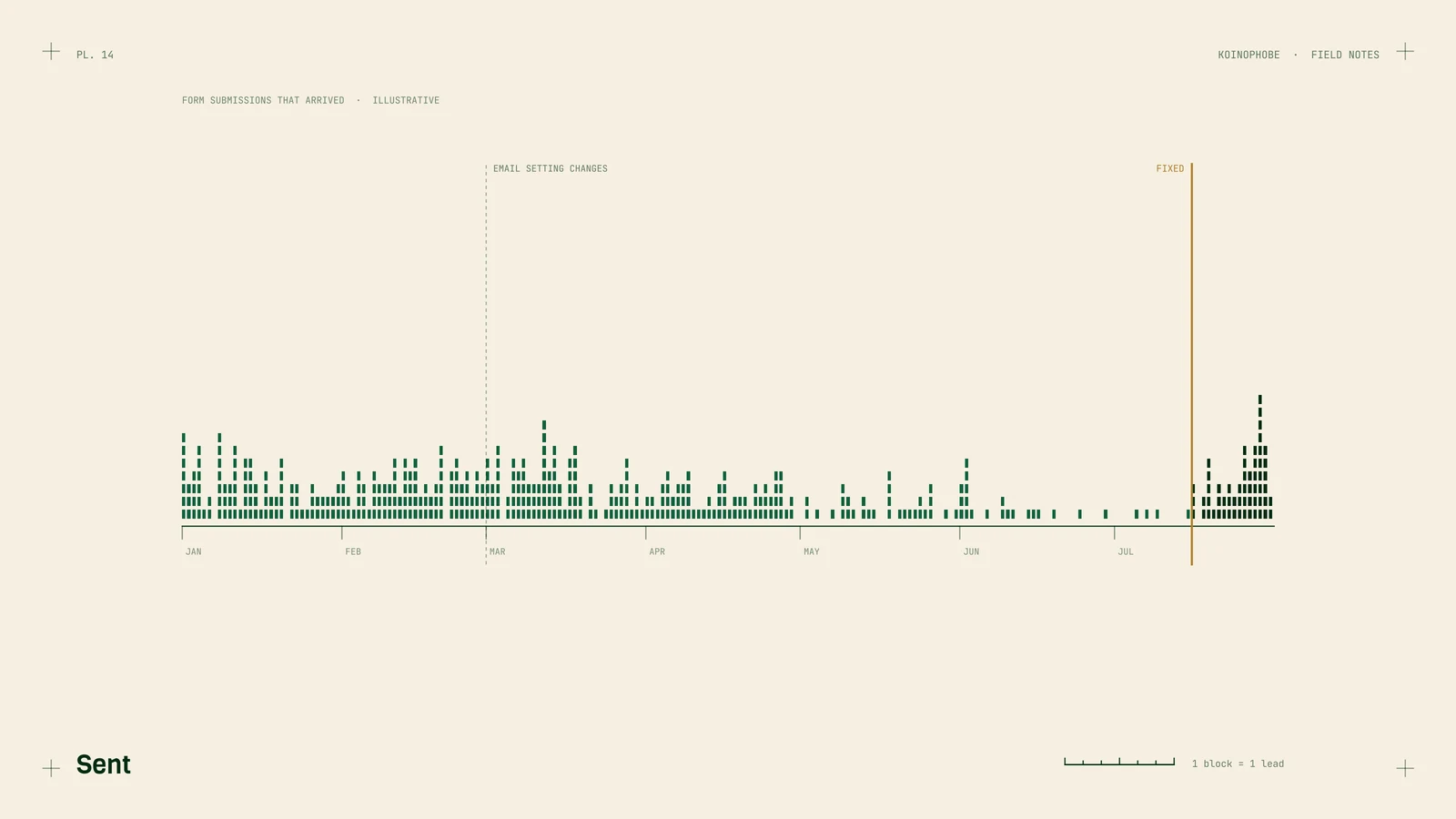
In July 2026 we found that a client's form submissions had been dropping since March. The form was built in Elementor. The cause was an email setting: after an email address change on the account, the SMTP connection the site used to send mail needed re-authenticating.
Four months. Nobody noticed, and that includes us.
Some background on why this happens. WordPress can send mail straight from the web server, but those messages often land in spam or get rejected. So most sites use an SMTP plugin that sends through a real mail account instead. That connection depends on the account's login or authorization. Change the email address or the password, and the plugin can lose its connection without telling anyone.
The fix was re-authenticating the SMTP connection and sending test submissions until they arrived in the right inbox. We can't tell you how many people filled out that form between March and July. Anyone who didn't follow up by phone may well have hired someone else.
Cause two: a speed plugin that stopped forms submitting
On another client site, the forms stopped submitting at all. The cause was SiteGround Speed Optimizer, SiteGround's own speed plugin. Its combine and minify setting merges and shrinks the site's code files so the browser makes fewer requests.

That sounds harmless, and on many sites it is. Form plugins, though, can depend on their scripts loading in a certain order, and combining files can change that order.
What fixed it:
- Turn off the combine and minify setting.
- Exclude the page with the form from caching.
- Purge all caches.
Then test the form from a browser where you're logged out. Logged-in users often skip the cache, so a form can work for you in the dashboard and still fail for a visitor.
The lesson: any time a speed setting changes, test the form right after.
The monthly form test
We now test form delivery on every site we work on, once a month. Here's the checklist:
- Submit every form on the site, including quote forms in popups, sidebars and footers. Use a phone for at least one of them.
- Put something like "TEST, please ignore" in the name field so whoever reads the inbox knows.
- Confirm the email arrives in the inbox the business owner actually reads. Check the spam folder too.
- Check the form plugin's own record. Elementor Pro keeps one under Elementor > Submissions. If the entry is there but the email isn't, the problem is mail delivery.
- If you track form submissions in GA4, open Realtime and confirm the event fired.
- Compare this month's submission count to last month's. A drop while traffic holds steady is a warning sign.
- Repeat the whole test right away after an email or password change, a plugin or theme update, a hosting move, or any new caching or speed setting.
Write down the date each time. If a form breaks later, you'll know the last day it worked, which narrows down what changed.
Why this is part of SEO work
A form that doesn't deliver throws away the traffic that SEO work brings in. We've written about why rankings mean little without tracking, and forms are one of the three events worth tracking on a local business site. Phone taps are the other big one, and here's how to track phone clicks in Tag Manager.
If you'd like a second set of eyes on your forms and tracking, send us your site. Plans and prices are on our pricing page.
Frequently asked questions
Why did my WordPress contact form stop sending emails?
A common cause is the email connection. If the address the site sends from changes, an SMTP plugin can need re-authenticating, and messages stop arriving without an obvious warning.
Can a speed or caching plugin break a contact form?
Yes. On one client site, the SiteGround Speed Optimizer combine and minify setting stopped forms from submitting. Turning that setting off, excluding the page from caching and purging all caches fixed it.
How often should I test my website contact form?
Once a month, and again after any email change, plugin update, hosting move or new speed setting. Send a real test and confirm it lands in the inbox someone reads.