HVAC SEO: get your pages live before the season turns
HVAC SEO runs on two seasons. Which service pages to build, when to publish them, a maintenance plan page, HVACBusiness schema and how to track the calls.
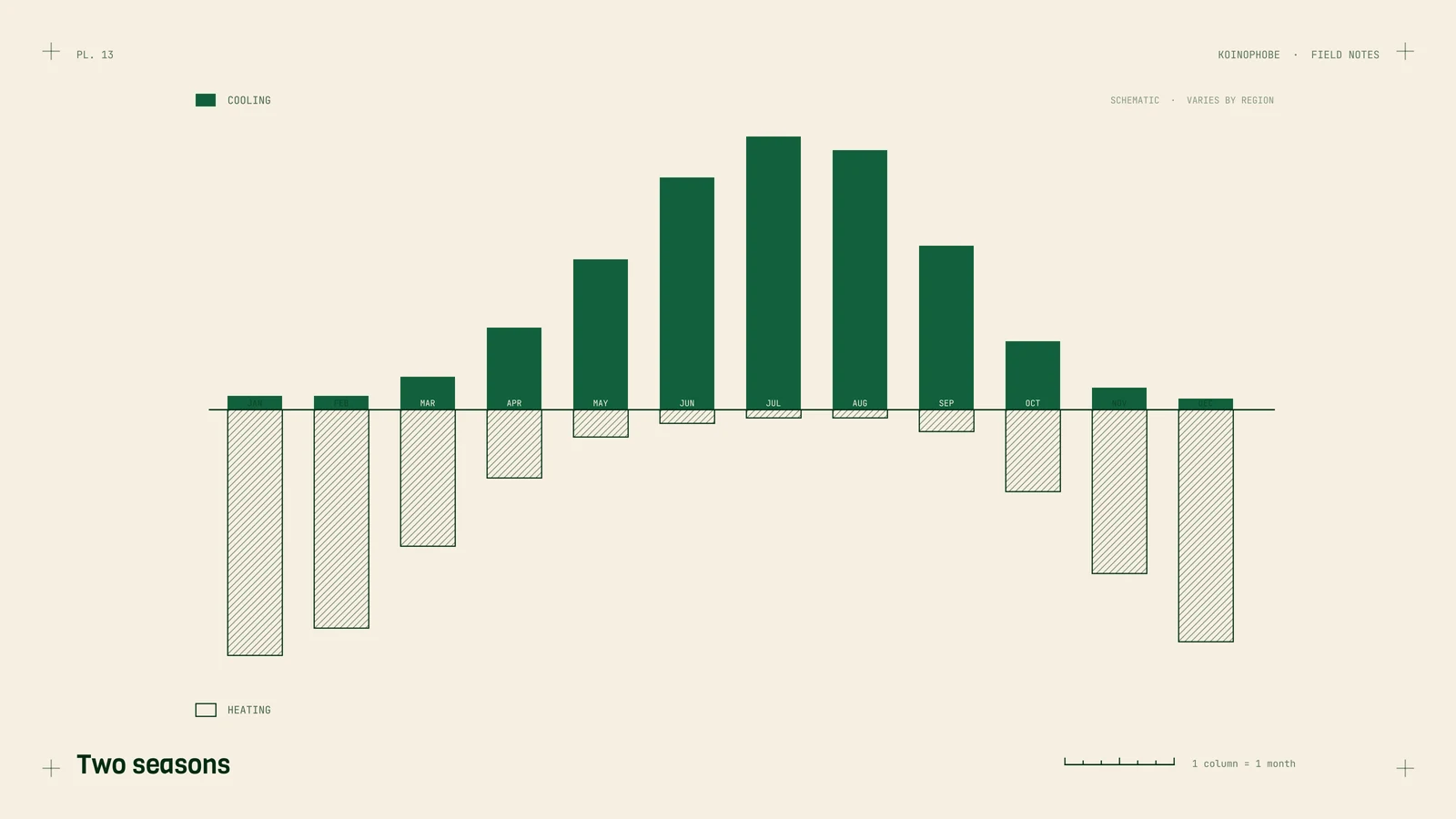
HVAC demand runs on two seasons. Cooling searches climb as summer heats up and heating searches climb when the weather turns cold. How the year splits depends on where you work: in the Deep South cooling covers most of the calendar, and in the northern states heating carries more of it. Either way, the searches you want arrive in waves, and a page has to be in place before its wave.
Most of the sites we work on are roofing, pool deck, lawn and shutter companies. HVAC searches follow the same rules, so this is the setup we'd build for an HVAC company. Where we point to results, they come from those trades.
Why the timing matters
A new page doesn't rank the day you publish it. Google has to find and index it, then test it against the pages already ranking, and that can take weeks or months. If you publish your furnace repair page during the first cold week, you've missed most of the busy stretch.
You can see your own pattern in Google Search Console. Open the Performance report, compare the last three months with the same three months a year ago, and look at which queries rose and when. That tells you when your area's searches start, and your publishing date should land a couple of months before it.
Seasonal content works in other trades too. For a hurricane shutter company we work with, 37 of its 51 clicks in one 28-day window came from a single seasonal hurricane history article.
The service pages to build
People search the job and the equipment. One "Heating and Cooling" page gives Google little to rank for ac repair or heat pump installation. Build a page for each job you want more of:
- AC repair. Common failures, brands you service, how fast you can get there, emergency hours if you offer them.
- Furnace repair. Gas and electric, the warning signs, safety notes on carbon monoxide.
- Heat pump installation. Sizing, what the install involves, any utility rebate programs in your area if you know them well.
- Maintenance plans. See below.
- Indoor air quality. Filters, purifiers, humidity control, whatever you sell and install.
Each page needs its own title tag with the service and your main town, a tap-to-call button near the top, photos of your own jobs, and the questions customers ask on the phone.
A maintenance plan page
Maintenance plans bring repeat visits and steady revenue, and homeowners do search for them (ac tune up, hvac maintenance plan). Give the plan its own page. It should say what each visit includes, how many visits a year and when, what members get (priority scheduling or discounts, if you offer them), the price or a starting price, and a way to sign up from the page.
Business Profile and town pages
The map pack drives a lot of HVAC calls, and it runs on your Google Business Profile. Pick the primary category closest to most of your work and add secondary categories only for services you provide. Set service areas by city or ZIP (up to 20, within about 2 hours' drive). Use your real business name, with no keywords added. Keep hours true, and use special hours for holidays.
For each town you serve, a page about that town can help with hvac [town] searches, as long as it has real local content. Near-identical pages with the town name swapped break Google's doorway abuse policy. On a Florida roofing site we work on, a real service page per town was one of four changes made while average position moved from 47.9 to 14.9 (October 2025 to August 2026, against the eleven months before). The details are on our roofing SEO page, and our plumbing SEO note lays out the same page structure for another trade.
HVACBusiness schema
schema.org has an HVACBusiness type. Add it to the homepage as JSON-LD with your name, phone, hours, service area and URL, matching your Business Profile exactly, and add Service markup on each service page. It helps Google confirm who you are. It won't lift rankings by itself.
Track calls by season
HVAC is a phone business, so measure calls. Track website phone taps as a GA4 key event; our Google Tag Manager phone click tracking note walks through the trigger and tag. Count Business Profile calls separately in the profile's performance view. Then compare calls month by month against the season, so you can tell whether a slow July is the weather or the website. If you want the wider setup, the three events every local business should track covers calls, forms and bookings.
Your next step
Pick the season that's coming next and check whether its service pages exist and are indexed (URL Inspection in Search Console tells you). If they aren't, that's this month's job. If you'd like it done for you, the Setup Sprint on our pricing page covers tracking, schema and Business Profile cleanup.
Frequently asked questions
When should an HVAC company publish seasonal pages?
Months before demand peaks. New pages can take weeks or months to be indexed and settle in rankings, so a furnace repair page should be live well before the first cold snap in your area.
Does an HVAC website need a maintenance plan page?
Yes, if you sell plans. Give it its own page that says what each visit includes, how many visits a year, what members get and how to sign up.
What schema should an HVAC website use?
Use the schema.org HVACBusiness type on the homepage with your name, phone, hours and service area, matching your Business Profile. Add Service markup on each service page.