Duplicate, Google chose different canonical than user: what to do
You told Google which URL to index and it picked a different one. How to see Google's choice, the reasons it overrides a canonical tag, when Google is right, and how to line up redirects, canonicals, sitemaps and internal links so it agrees with you.

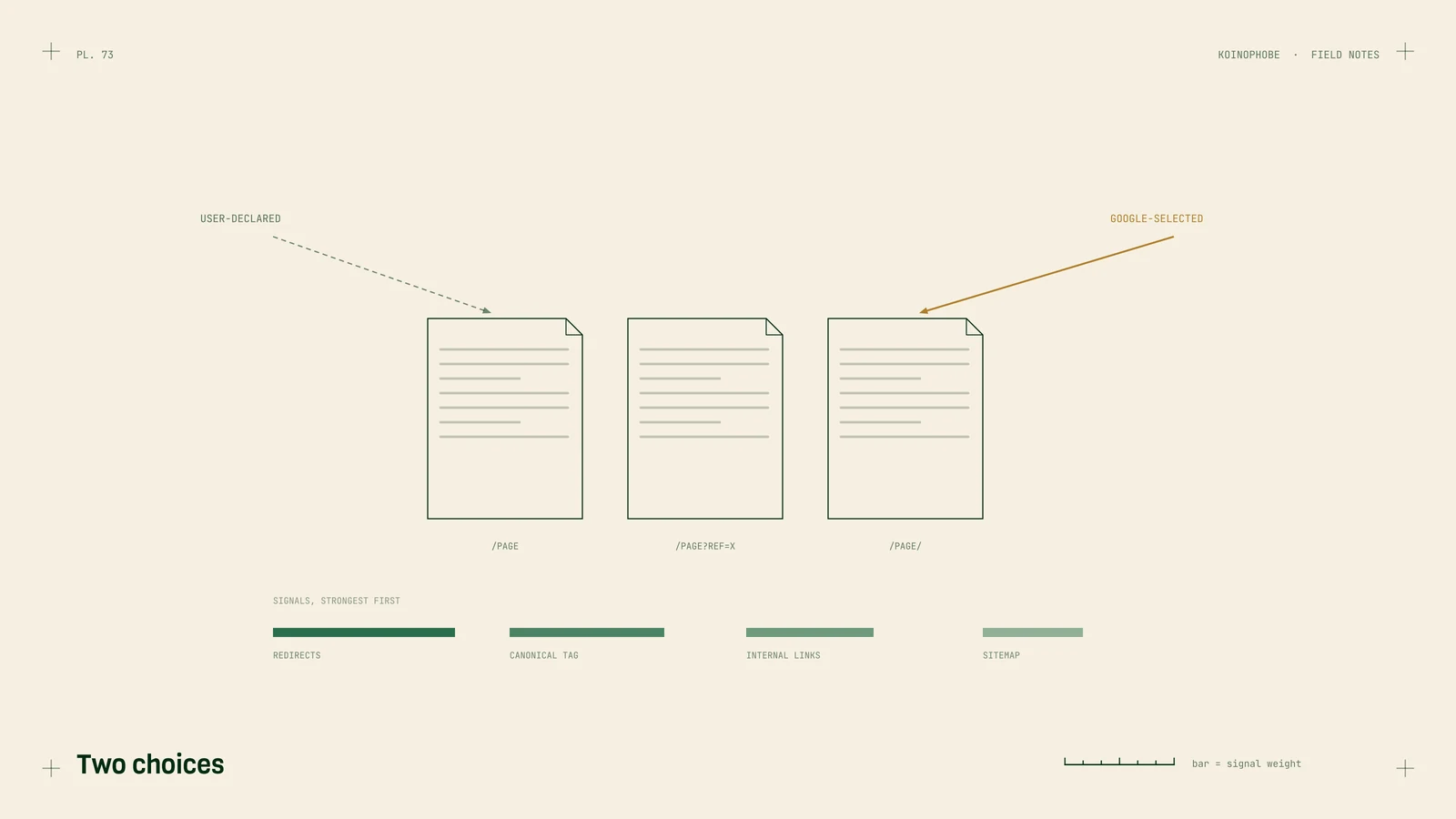
This status in Search Console's Page indexing report means you told Google which URL to index, and Google picked a different one. Your canonical tag points to page A; Google decided page B is the better version of the same content.
Sometimes Google is right and nothing needs fixing. Sometimes it's grouping pages that shouldn't be grouped. The first step is finding out which.
See what Google chose
Open the URL Inspection tool and enter one of the affected URLs. Under Page indexing, you'll see two lines:
- User-declared canonical: the URL in your canonical tag.
- Google-selected canonical: the URL Google chose.
Open both and compare them. You'll usually land in one of three cases.
They're the same page at two addresses. http and https, www and non-www, with and without a trailing slash, with a tracking parameter. Google chose one version; you need to make every signal agree on it.
They're different pages with nearly the same content. Two town pages with the same text, a product in two colors, a blog post and its printer version. Google treats them as duplicates and keeps one.
Google picked the wrong page entirely. A page that redirects, or an old version you thought was gone. That's a signal problem, and it's fixable.
Why Google overrides a canonical tag
Google's documentation calls rel="canonical" "a strong signal." Google weighs it against everything else:
- Redirects, the strongest signal. If A redirects to B, Google will pick B.
- Sitemaps, a weak signal. If your sitemap lists B while your canonical says A, you're contradicting yourself.
- Internal links. Google recommends linking to the canonical version. If your menu links to the
wwwversion and the canonical says non-www, the signals split. - HTTPS. Google prefers HTTPS unless there are issues such as an invalid certificate or HTTPS pages that redirect to HTTP.
- How similar the pages are. The more alike, the more freely Google picks.

Line up the signals
Pick the URL you want, then make every signal point to it:
- Redirect true duplicates.
httptohttps, one host version to the other, one trailing slash style to the other, all with a single 301. - Use absolute URLs in the canonical tag, and put a self-referencing canonical on every canonical page. Google recommends both.
- List only canonical URLs in the sitemap.
- Point internal links at the canonical URL. Menus, footers and in-text links.
- Keep JavaScript away from the canonical. If a script changes the canonical tag after load, Google may see two values. Our Next.js checklist shows how to set it in the server response.
Two things not to use for this: robots.txt, which can leave blocked URLs indexed without their content, and noindex, which removes a page from Search completely.
When the pages are distinct but too similar
If Google is grouping two pages you want indexed separately, the fix is the content. Two town pages that differ only in the town name will keep getting folded together. Add what's true about each place: jobs you've done there, photos, the problems common to that area, how quickly you get there. Service area pages shows how.
If the pages don't have enough to say separately, merge them into one stronger page and redirect the other. That's often the better result.
After you fix it
Request indexing for the URL you want in URL Inspection, then use Validate fix in the Page indexing report. Expect a few weeks before the status updates across the site. Crawled, currently not indexed and discovered, currently not indexed cover the two statuses that often show up alongside this one.
Where to start
Inspect three affected URLs today and sort them into the three cases above. If they're all the same-page-two-addresses case, the fix is a redirect rule and a sitemap update. If you'd like the full indexing review done for you, it's part of our Site Audit on the pricing page.
Frequently asked questions
What does duplicate, Google chose different canonical than user mean?
The page has a canonical tag pointing to one URL, but Google decided another URL is the better version to index. The URL Inspection tool shows both: the user-declared canonical and the Google-selected canonical.
Why does Google ignore my canonical tag?
A canonical tag is a strong signal, and Google weighs it against redirects, internal links, sitemaps, HTTPS and how similar the pages are. If those point elsewhere, or the pages are near-identical, Google can pick a different URL.
Is Google chose different canonical bad?
Not always. If the two URLs are duplicates and Google picked the one you'd want anyway, nothing needs fixing. It matters when Google picks the wrong version, or when it groups distinct pages, such as two town pages, as duplicates of each other.